The Goal
One AI safety paper per day, published to failurefirst.org with four generated artifacts: an audio overview, a video walkthrough, an infographic, and a prose blog post. All produced from a single PDF. No manual writing, no manual media creation, no manual deployment.
We built this. It works. 33 papers are live on the site. Getting here required solving a chain of infrastructure problems that nobody documents — so we are documenting them.
Architecture
The pipeline has five stages, each a standalone script:
-
Discovery (
discover-papers.sh): keyword search across arXiv categories (cs.AI, cs.RO, cs.LG, cs.CL), relevance scoring, append to a queue file (papers.txt) with scheduled publication dates. -
Analysis (
analyze-paper.sh): Claude (via OpenRouter) reads the abstract and first page, producesanalysis.json— title, paper type, key topics, and a custom research-focus prompt for NotebookLM. -
Artifact generation (
nlm_runner.py): the async runner creates a NotebookLM notebook, uploads the PDF, then kicks off artifact creation — blog post, audio, video, infographic. Polls for completion. Writes an atomicmanifest.jsonper paper. -
Blog post rendering (
generate-blog-post.sh): fills an Astro frontmatter template, copies media files to the site’s public directory. -
Publish (
publish-to-site.sh): copies the markdown intofailure-first/site/src/content/daily-paper/, then Astro builds todocs/which GitHub Pages serves.
The orchestrator is batch-notebooklm.sh — a bash script that reads the queue file, manages daily limits and state, caches the notebook list to avoid O(n^2) API calls, and delegates artifact creation to the Python runner.
The Runner: nlm_runner.py
The core engineering challenge was artifact generation. NotebookLM’s CLI (nlm) creates artifacts asynchronously — you issue a create command, get back an artifact ID, then poll until it completes. Different artifact types take wildly different amounts of time.
nlm_runner.py handles this with per-artifact timeouts (discovered empirically, not documented anywhere):
| Artifact | Timeout |
|---|---|
| Blog post | 180s |
| Infographic | 300s |
| Audio overview | 600s |
| Video overview | 900s |
Audio originally had a 300-second timeout. It timed out consistently. We bumped it to 600 seconds. Video generation takes 10-15 minutes per paper — the 900-second timeout is not generous.
The runner writes an atomic manifest (tempfile + os.replace) per paper. This gives us idempotent retry: if a run fails partway through, the next invocation skips already-completed artifacts and only retries what failed. Exit code 0 means everything succeeded, exit code 2 means partial failure (at least one artifact failed but the required blog post might have succeeded), exit code 1 means something went structurally wrong.
What Broke
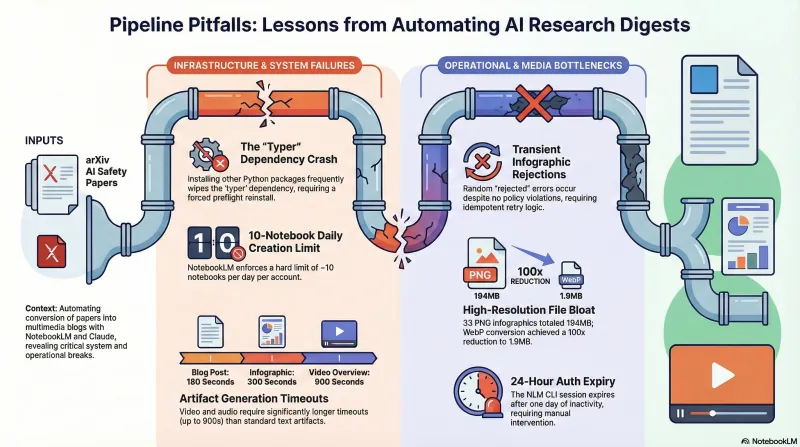
The typer dependency
The nlm CLI depends on typer. Installing other Python packages frequently wipes typer from the environment, causing nlm to crash with ModuleNotFoundError: No module named 'typer'. This happened repeatedly — often mid-batch. The fix is pip install typer --force-reinstall, and we now run nlm --version as a preflight check before every batch.
The 10-paper daily limit
NotebookLM enforces a limit of approximately 10 notebook creations per day per account. We discovered this empirically after a batch of 49 papers queued up and only 10 processed. The batch script tracks daily count in notebooklm-state.json and auto-resets when the date changes.
Transient infographic rejections
nlm infographic create occasionally returns a “rejected” error for no apparent reason. It is not a content policy issue — the same paper succeeds on retry. We suspect a rate limit or concurrent request conflict on the NLM backend. The runner logs the failure, and the manifest makes retry straightforward.
The “no artifact ID returned” error
When nlm_runner.py reports this, the underlying CLI actually failed — but the runner truncates the error to 80 characters. The fix: run nlm <artifact> create <notebook_id> -y directly to see the real error message. Usually it is an auth expiry or a transient backend issue.
194 MB of infographics
NotebookLM generates infographics as high-resolution PNGs. For 33 papers, this totalled 194 MB in the site repo. We added a WebP conversion step that brought the total down to 1.9 MB — a 100x reduction — with no visible quality loss at the sizes we display them.
State Management
Two levels of state keep the pipeline resumable:
Global state (notebooklm-state.json): tracks which papers have been processed, which failed, the last run date, and today’s count against the daily limit. Auto-resets the counter when the date rolls over.
Per-paper state (manifest.json): records the notebook ID, each artifact’s status (pending/running/complete/failed), artifact IDs, output paths, and elapsed time. Written atomically to prevent corruption from interrupted runs.
This two-tier approach means we can kill the pipeline at any point and resume without re-processing completed work.
How Claude Code Fits In
Claude Code orchestrates the entire workflow. It runs the discovery script, reviews the queue, kicks off batch processing, monitors for failures, retries failed papers, runs the blog post generator, publishes to the site repo, triggers the Astro build, and commits the output. The pipeline scripts are designed for non-interactive execution — every script accepts arguments, produces structured output, and uses exit codes that Claude Code can branch on.
The operational pattern is: Claude Code reads the queue, runs the batch, inspects the manifests, fixes what broke (usually pip install typer --force-reinstall), retries the failures, then publishes. A full cycle for 10 papers takes about 45 minutes, dominated by video generation time.
Results
33 papers published to failurefirst.org. Each has a prose summary, most have audio overviews and infographics, many have video walkthroughs. The pipeline processes new papers daily with minimal intervention — the main recurring task is re-authenticating the NLM CLI session when it expires after ~24 hours of inactivity.
The technical lesson: building a reliable content pipeline is mostly plumbing. The interesting AI parts (NotebookLM generating the content, Claude analyzing the papers) work well when you call them correctly. The engineering effort goes into retry logic, state management, timeout tuning, dependency management, and media optimization. The failures taught us more about the system than the successes did — which is, after all, the thesis of this entire project.
Restored from the 2026-05-21 archive. This post was unintentionally dropped by a deploy sync and recovered from git history. Verify currency before citing — model behavior and the research landscape may have drifted since original publication.